![Backpack-Horizontal-Color-Dark@2x-1.png]](https://kb.backpacknetworks.com/hs-fs/hubfs/Backpack-Horizontal-Color-Dark@2x-1.png?width=177&height=36&name=Backpack-Horizontal-Color-Dark@2x-1.png)
What is the Utility Bill Summary?
Get more out of your data with the Backpack Utility Bill Summary. Designed for proactive users, this subscription-based notification helps you:-
Simplify Monitoring: See exactly how your usage and costs change month-over-month
-
Stop Leaks Early: Catch spikes in water usage instantly, saving you from expensive repairs and high bills
-
Beat the Mail: Get your utility details in your inbox within 24 hours, often days before the provider sends their own notification
When will I receive the Utility Bill Summary email?
The Utility Bill Summary email is sent when one of the following occurs. All bills received in a 24-hour period will be included in the email.
-
A new utility bill is received from the provider
-
A manual bill is received by Backpack
- Aggregate data is received by Backpack
Who receives the Utility Bill Summary email?
Any user associated with a property can receive the Utility Bill Summary email. This article details how to subscribe/unsubscribe to the email: Backpack Notifications.
What is contained in the Utility Bill Summary Email?
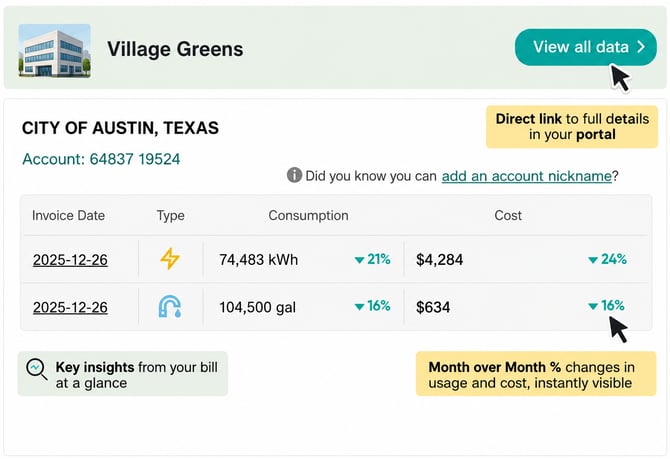
The Utility Bill Summary email contains a summary of bill cost and consumption data by utility account & property. A user could have multiple accounts and properties in each email depending on their portfolio of properties. The email is configured to send a notice within 24 hours of receipt of a new bill and will include all bills received in the last 24 hours.
Key components
-
Month over Month Percentage Changes in usage and cost, instantly visible
-
Important insights pulled out from long bills, so you see what’s important at a glance & decide if you want to dig in more
Here is an example of the Utility Bill Summary with a few key insights.
Questions?
Contact support@backpacknetworks.com.